



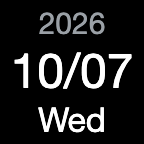

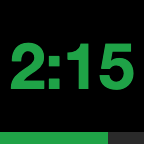
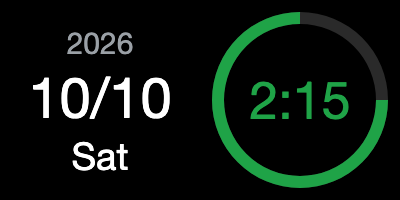
Examples of the key and dial display (dark colors). The actual display depends on your settings.
DayTimeStrip is a plugin for Stream Deck. One key shows the date (or a clock) and also works as a timer. You can also place it on a dial of Stream Deck +. DayTimeStrip is coming soon to the Elgato Marketplace.
What it does
Section titled “What it does”- Date and timer on one key: press and hold the key to switch between the date side and the timer side. The timer keeps running while the date is shown.
- Date or clock: on a key, the date side shows a calendar (such as the date and the day of the week) or a clock (the current time). A Stream Deck + dial shows the date on the left, and on the right a clock that turns into the timer while it runs.
- Your look: choose a layout (text or card) and colors (dark, light, or monochrome) for each key or dial.
- Timer lengths: set up to five lengths, each 1 to 99 seconds, minutes, or hours. The default is 3 minutes.
- When the timer ends: the display turns the end color,
0:00blinks, and a macOS system sound plays — once, or until you stop it (it stops by itself after 60 seconds). You can choose the sound and listen to it in the settings. The volume follows your Mac’s system volume. - Sleep and restart: the time left is calculated from the scheduled end time, so it stays correct while your Mac sleeps, and the timer continues after the Stream Deck app restarts. If a timer ends while your Mac is asleep, DayTimeStrip shows that it has finished when your Mac wakes, without playing the sound.
How to use it
Section titled “How to use it”On a key (timer side)
- Tap to start, pause, or resume the timer.
- Double-tap to move to the next timer length (before starting), or to reset (while running or paused).
- Press and hold to switch between the date and the timer (on either side).
On a Stream Deck + dial
- Turn to choose a timer length.
- Press to start, pause, or resume.
- Press and hold the dial, or touch and hold the screen, to reset.
Requirements
Section titled “Requirements”- Stream Deck keys, and the dials and touch screen of Stream Deck +
- Stream Deck app 7.1 or later
- macOS 12 or later (macOS only; Windows is not supported)
- The settings and the text on the key are in English or Japanese, following the language of the Stream Deck app.
Purchase
Section titled “Purchase”DayTimeStrip will be sold on the Elgato Marketplace. The conditions of purchase are our Terms of Use and the terms of the Elgato Marketplace. This section gives an overview.
- Price: ¥330 (Japanese yen). Taxes may be added depending on your country or region. The price may be shown converted to your local currency. The total shown at checkout is the amount you pay. Internet connection costs for buying and downloading are yours.
- Payment: you pay on the Elgato Marketplace as part of your purchase. The payment methods you can use are listed in Elgato’s help article.
- Delivery: you can download DayTimeStrip right after your purchase.
- Refunds: refunds follow the Elgato Marketplace refund policy. Requests must be made within 14 days of purchase. After you download DayTimeStrip, refunds are given only in the cases that policy describes, such as a problem that is not fixed. Elgato decides whether to give a refund; k-five LLC does not issue refunds. If you have a problem, please contact us first at support@k-five.co.
- Requirements: Stream Deck keys, and the dials and touch screen of Stream Deck +; Stream Deck app 7.1 or later; and macOS 12 or later (macOS only; Windows is not supported). See also “Requirements” above.
- Business information: see the notation based on the Act on Specified Commercial Transactions (in Japanese) on the k-five LLC website.
How DayTimeStrip uses your data
Section titled “How DayTimeStrip uses your data”- DayTimeStrip does not connect to the internet. It communicates only with the Stream Deck app on the same Mac.
- There is no account or sign-in, and no analytics or advertising.
- Your settings and the state of your timers are stored using the Stream Deck app’s settings.
- For details, see the Privacy Policy.
Contact
Section titled “Contact”support@k-five.co — k-five LLC (Support)

 © k-five LLC
Stream Deck and Elgato are trademarks or registered trademarks of Corsair Memory, Inc. Google Calendar is a trademark of Google LLC. Microsoft, Microsoft 365, Outlook and Windows are trademarks of the Microsoft group of companies. Apple, Mac and macOS are trademarks of Apple Inc., registered in the U.S. and other countries and regions. All other trademarks are the property of their respective owners. Strip is an independent product of k-five LLC and is not affiliated with or endorsed by Elgato, Corsair, Google, Microsoft or Apple.